Hello, how can I add subtitle content to the large screen in the software? The subtitle function of the media player cannot input text and insert it onto the canvas for display. How can this be solved?
You can add SRT subtitles files to existing media items. Then you select loaded subtitles file in media item settings in playlist. During that item playback there will be subtitles string constantly updated on the Media Player node subtitles output. You need a TextImage node to render that text into image with transparancy, and a patch to put it on your output at the desired location. If this is a fulldome setup - use Planar to Dome node to place it on the virtual plane at the front bottom of the screen. Connect it to Render Target that is used as a composition for you content before calibrator or manual patches if you calibrate manually.
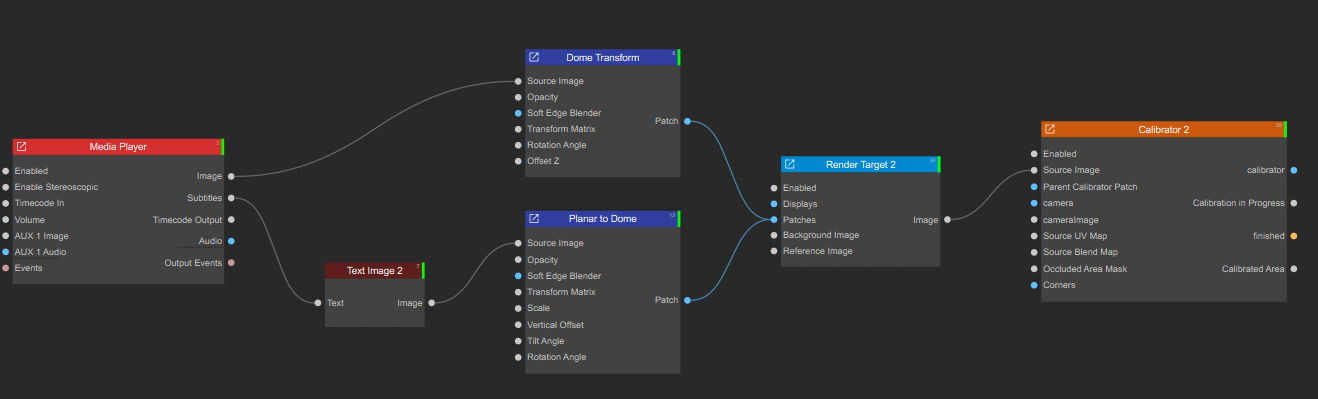
I’ve tried, but I couldn’t load the subtitles on the media player. Is there a bug with the 3.3.6 software regarding the subtitles, or are there any other detailed operation procedures?
Open media player with playlist and your item. Drag and drop srt file from windows explorer onto the item. It will show upload dialog with “Add subtitles” button. Press add subtitles, it will add srt file to the item.