Hello,
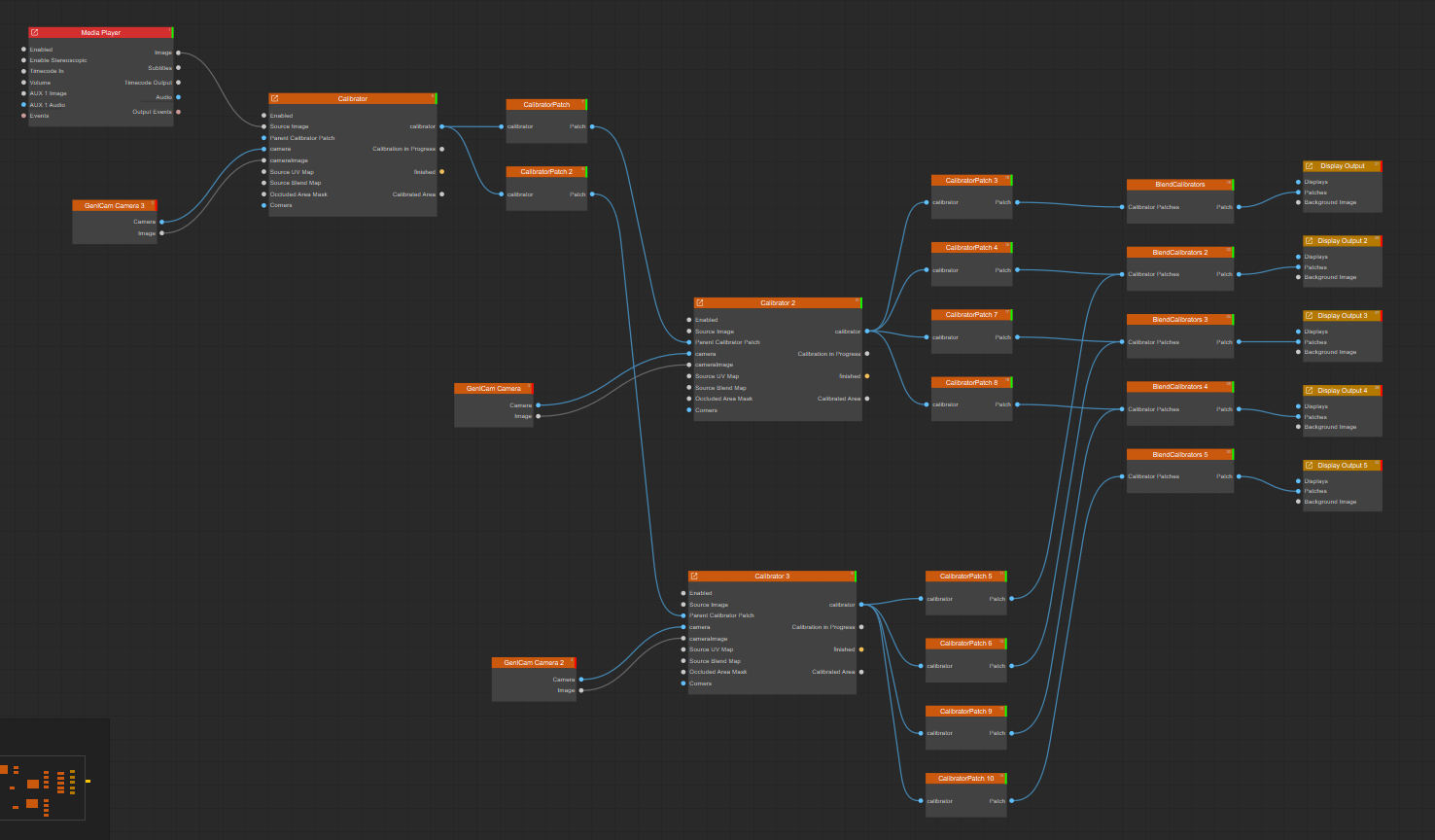
Are there any sample projects or similar resources available that demonstrate how to use the Parent Calibrator Patch?
Hello,
Are there any sample projects or similar resources available that demonstrate how to use the Parent Calibrator Patch?
Multi camera calibration is documented poorly. Here is a draft for that feature.
Use a parent calibrator when one camera can see the entire projection surface.
This arrangement is useful for a dome with multiple fixed cameras around its perimeter. Each perimeter camera calibrates the projectors it can see. A central camera that sees the whole dome is then used once to calibrate the geometry between the perimeter-camera regions.
The parent/child arrangement combines the perimeter-camera calibrations into one virtual projection layer. Using the central camera, the parent calibrator calibrates the complete screen as though the regions covered by the perimeter cameras were ordinary projectors. After this relationship has been calibrated, the central camera does not need to remain in the installation.
Do not use a parent calibrator if there is no camera position from which the entire screen is visible. In that case, align the camera-calibrated regions manually or use 3D Scene remapping.
Create additional child calibrators and blending nodes as required by the physical setup.
Patch output directly to the corresponding child calibrator’s Parent Calibrator Patch input.Only the link in step 10 is needed to pass a parent patch to a child calibrator. Do not also recreate the source and map connections manually.
During parent calibration, the parent patch is rendered to an intermediate render target and used as the source image for the child calibrator. This lets the parent display calibration patterns through the already calibrated child output.
After calibration, normal content should be sampled only once on its way to the physical projectors. Sampling the rendered parent patch again would add an unnecessary render and resampling stage. The child calibrator therefore uses the parent patch’s calibration maps directly:
Connecting a parent Calibrator Patch to Parent Calibrator Patch switches between these behaviors automatically. While the parent is calibrating or showing a test pattern, the child uses the rendered parent patch. During normal playback, it uses the source and maps directly.
Parent Calibrator Patch input.Thank you. I understand it well.