Hello, does the Screenberry software have the functions of playing videos while displaying subtitles, real-time detection of certain data such as weather forecasts for a specific city in a certain country, and so on? How can I make settings in the software?
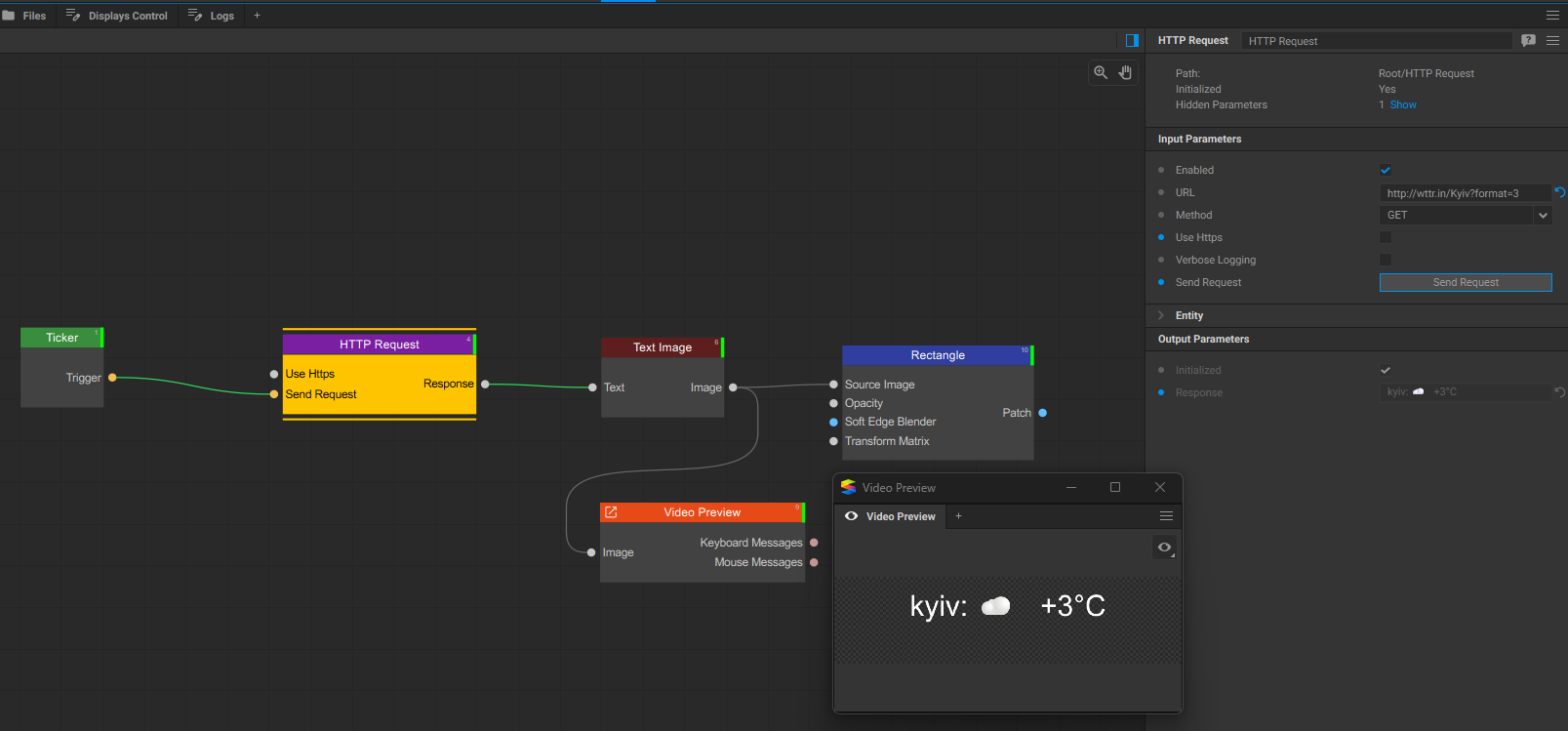
Add HTTP Request node, enter url: http://wttr.in/Kyiv?format=3, add Ticker, configure it to trigger every 1000 frames (4 times per minute), connect it to Send Request input of HTTP Request.
The output parameter Response of HTTP Request connect to Text Image node, configure it to 800x200 size, then use Rectangle or other patch to put that text on your output as you like
According to your plan, the test in your country showed normal weather conditions. However, when I tested in our country, Beijing, China, it indicated that “Client sent an HTTP request to an HTTPS server.” Switching to other cities won’t work either! What is the problem? This is my test of our country’s weather ( wttr.in — Weather Report ? ) (format = 3) When I open it using the browser webpage, it works properly. How should we solve this problem?
According to your plan, the test in your country showed normal weather conditions. However, when I tested in our country, Beijing, China, it indicated that “Client sent an HTTP request to an HTTPS server.” Switching to other cities won’t work either! What is the problem? This is my test of our country’s weather :wttr.in — Weather Report open it using the browser webpage, it works properly. How should we solve this problem?
I have solved this problem.
1 Like